
Features
It reads what's in the file, not what the label says
FileVerdict opens every audio and subtitle track, works out what it really is, and shows you why. Then it fixes the flags, the names and the folders so Plex and Jellyfin play the right track first time. Three tabs take you through it, and nothing is written until you approve it.
stream 0:3 · SRT subtitle
Organise
Label says
English
FileVerdict reads
Lines
41
Spread
6% of the running time, in short bursts
Words
Street signs, a text message, one song
Language
English, read from the text
Keep
set as forced subtitle · default off
Set your encode before anything else
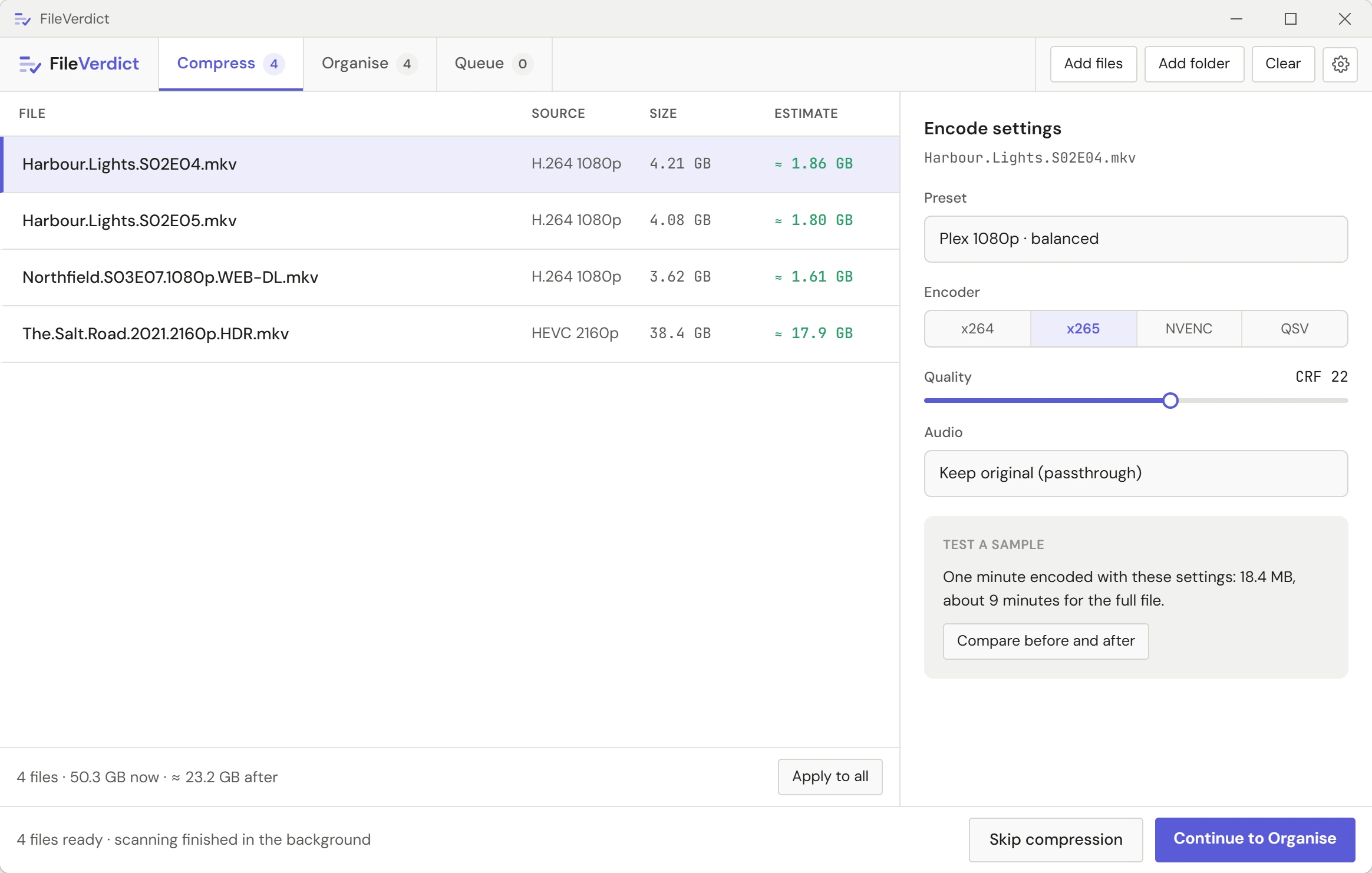
Every file opens straight into Compress. Pick one of twelve built-in presets or dial in your own encoder, quality and filters. Not sure what you'll get? Test a sample encodes one minute with your exact settings, then shows the size, the time it will take, and a before and after you can drag a divider across. Skip Compress completely if you only want to tidy tracks and names.
Encoders
x264, x265 and AV1, plus NVENC, Quick Sync and AMD hardware encoding
HDR
HDR10 and HLG kept; Dolby Vision kept when the video is passed through
Audio
Audio set once per layout: 7.1, 5.1, stereo and mono
Per file
One setting for the batch, a different one for the file that needs it
Every track, verdict and reasoning included
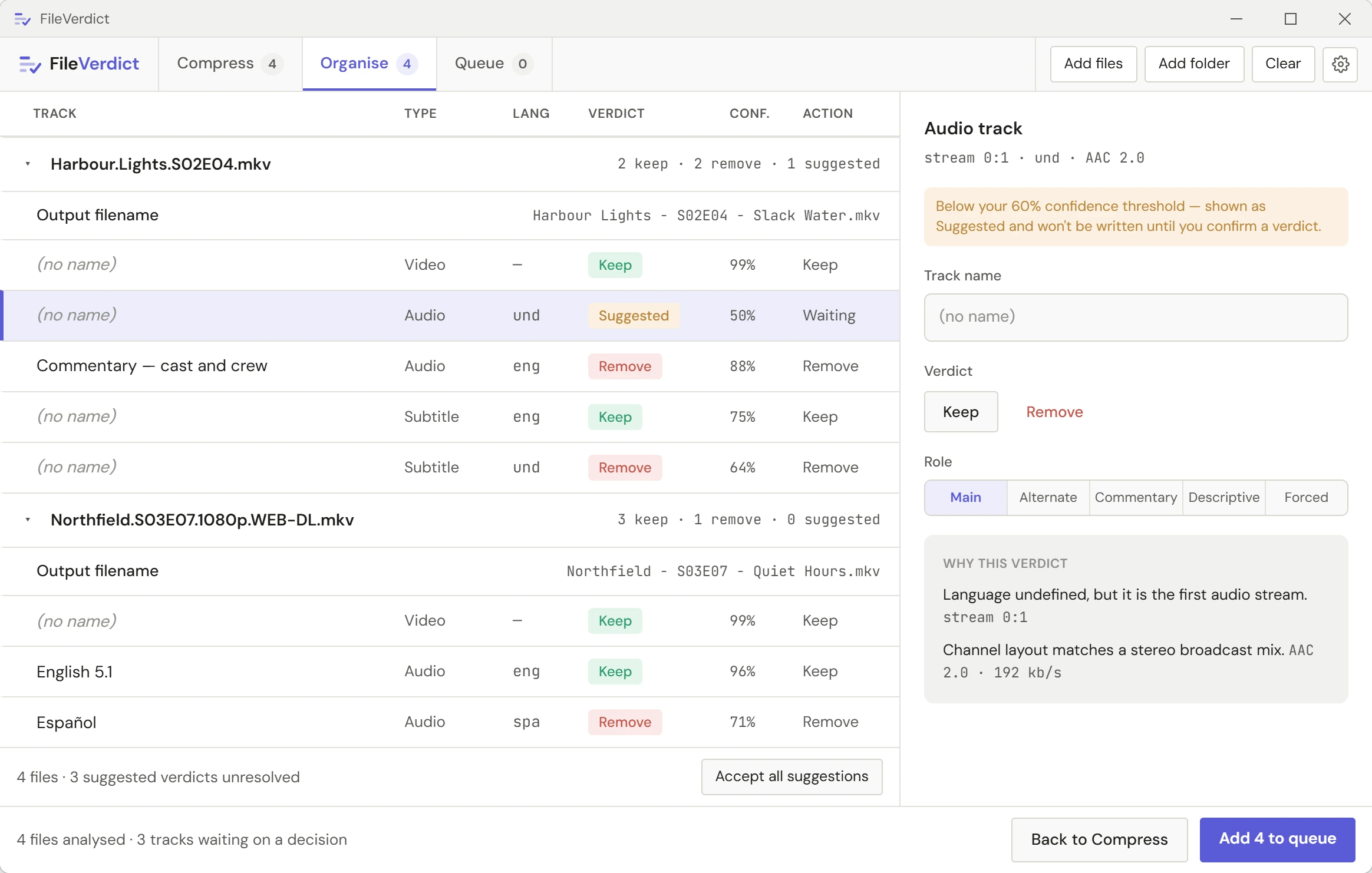
While you were setting up your encode, FileVerdict finished scanning in the background. Organise is where every track's verdict, its evidence, and a suggested filename are waiting for you, already filled in and ready to override. The OMDb or TMDB match is shown with its poster, and you can search again if it's picked the wrong title. Turn on library folders and each file is moved into place too. Nothing is written until you say so.
Verdicts
Keep, remove or review, per track
Naming
Plex and Jellyfin naming built in, or your own templates
Folders
Library folders: every video in its own folder, every episode in its season
Seasons
Change one episode, then copy your changes to the rest of the season
Apply
Apply the rename alone, or send it to the queue
Watch it run, or walk away
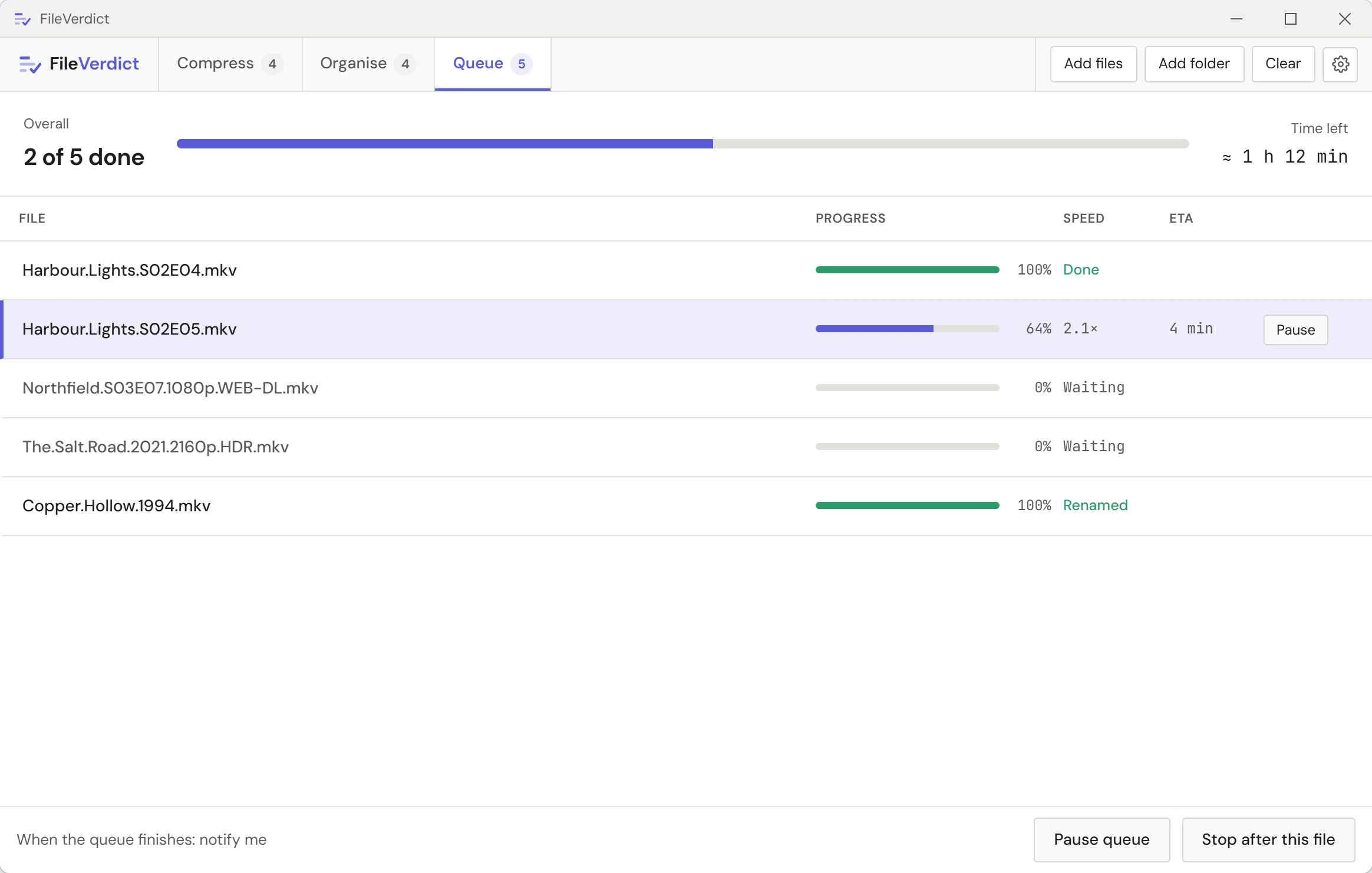
Apply your changes and the file joins the queue. Track progress and ETA, pause or stop the file that's encoding, and come back to a finished, organised library.
Progress
Progress, speed and ETA per file
Pause
Pause stops the encoder outright and resumes from the same point
When done
A notification when it's done, and sleep or shut down if you want it
Batch
Queue a whole season or library at once
The final verdict on your files.
A subtitle track called "English" could be the full dialogue or forty lines of translated signs. FileVerdict doesn't trust the label. It counts the lines, looks at how they're spread through the running time, and reads the words. Whatever led to the decision is right there next to it. Agree with it, override it, or leave it for review.
Commentary
Commentary found from what is said, including the cast and crew's real names
Language
Language read from the text, so a mislabelled track isn't removed by mistake
Unsure calls
Unsure calls are marked Suggested and left alone until you decide
Subtitles that play properly, on time, as text
Picture subtitles (PGS and VobSub) are read with text recognition, so they get a real verdict too. And when one is in the way, you can fix it here without opening another tool.
Convert to text
Turn a picture subtitle track into a text one, so Plex stops transcoding to show it. About half a minute for a feature-length video. English for now.
Sync subtitles
Lines early or late? Play a minute, press a key when you hear a line, and the whole track moves to match.
Duplicates
The same track stored twice is found and removed, and a near-copy is shown to you line by line before anything goes.
Edit and add
Delete the advert lines from a downloaded subtitle, or add your own .srt, .ass or .vtt file and have it judged like any other track.
Also in the app
Library health check
A read-only look over a whole library. 2,000 videos in a few minutes, and nothing is changed.
Keyboard review
K to keep, R to remove, N for the next track waiting on you.
No scan screen
Scanning starts when you add files and runs in the background while you work.
Presets you can share
Save your encode settings, export them as JSON, import them anywhere.
Your originals stay put
Changes go to a new file by default. Overwriting is something you turn on.
Private by design
No account, no telemetry. Your files never leave your PC.
Works offline
Scanning, renaming and encoding need no connection. The licence needs a check-in at least once every 14 days.
Logs you can send
A history of every file written, and a diagnostics log that keeps filenames but not your folder paths.